控制画布大小
控制画布大小
1
2
3
| <body>
<canvas id="canvas" width="500" height="500"> </canvas>
</body>
|
或者通过 css控制大小
1
2
3
4
5
| #canvas {
background: #f00;
width: 500px;
height: 5400px;
}
|
请不要同时使用,内容会被压缩,或者拉长
如果不支持可以在 canvas 中添加标签,标签会代替 canvas 进行展示
1
| <canvas><div>换个浏览器吧!求求了</div></canvas>
|
开始画
通过以下代码拿去上下文
1
2
3
4
5
6
7
8
| var canvas = document.getElementById("canvas")
var ctx = canvas.getContext("2d")
if(canvas.GetContext{
}else{
}
|
如何下笔
坐标系
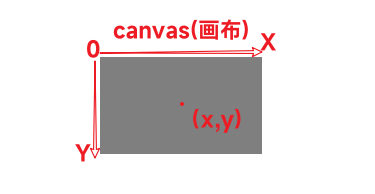
绘制直线
通过上下文的 beginPath()方法新建笔画
1
2
3
4
5
6
7
8
| var canvas = document.getElementById("canvas");
var ctx = canvas.getContext("2d");
ctx.beginPath();
ctx.moveTo(100, 100);
ctx.lineTo();
ctx.stroke();
ctx.fill();
ctx.closePath();
|
绘制矩形
1
2
3
4
5
6
7
8
9
10
|
ctx.rect(x, y, width, height);
ctx.stroke();
ctx.strokeRect(x, y, width, height);
ctx.clearRect(20, 20, 10, 100);
|
绘制圆形
1
2
3
4
5
6
7
8
9
|
ctx.arc(x,y,r,startAngle,endAngle,anticlockwise);
ctx.(100,100,50,0,Mat.PI);
ctx.stroke();
|
贝塞尔曲线
一次贝塞尔曲线
1
2
3
|
ctx.quadraticCurveTo(cp1x, cp1y, x, y);
|
二次贝塞尔曲线
1
2
3
|
ctx.quadraticCurveTo(cp1x, cp1y, cp2x, cp2y, x, y);
|
文本
1
2
3
4
5
6
7
8
|
ctx.fillText(text,x,y,[,maxWidth]);
ctx.strokeText(text,y,x[,maxWidth]);
ctx.font
ctx.textAlign="left|right|center|start|end"
ctx.textBaseLine="top|hanging|middle|alphabetic|ideographic|bottom"
ctx.direction="ltr|rtl|inherit"
|
图片
1
2
3
4
5
6
7
8
9
10
| var img = new Image();
img.src = "myInamge.png";
ctx.drawImage(img, x, y, width, height);
img.onload = function () {
ctx.drawImage(img, 0, 0);
};
img.src = "xxx.png";
drawImage(image, sx, sy, sWidth, sHeight, dx, dy, dWidth, dHeight);
|
前四个参数
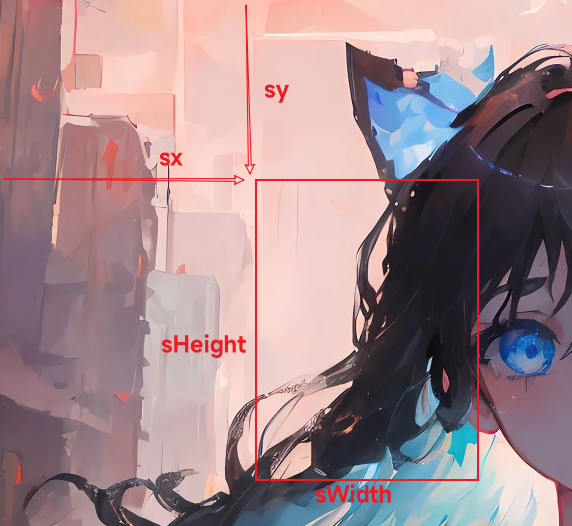
后四个参数
样式
requestAnimationFrame()让浏览器执行动画的方法,要求在浏览器的下一次重绘之前调用一个指定函数来更新这次动画
1
2
3
4
5
6
7
8
9
10
11
|
function animate(time) {
update(time);
draw();
window.requestAnimationFrame(animate);
}
window.requestAnimationFrame(animate);
|
让我们尝试绘制一个时钟
1
2
3
4
5
6
7
8
9
10
11
12
13
14
15
16
17
18
19
20
21
22
23
24
25
26
27
28
29
30
31
32
|
function animate(time){
const now = new Date();
const sec = now.getSeconds();
const min now.getMinutes();
const hr = now.getHours();
const ctx = document.getElementById("canvas").getContex;
ctx.save()
ctx.clearRect(0,0,600,600);
ctx.translate(300,300);
ctx.rotate(-Math.PI/2);
ctx.strokeStyle = 'black';
ctx.lineWidth = 5;
ctx.lineCap = 'round'
ctx.save()
for(let i=0;i<12;i++){
ctx.beginPath();
ctx.rotate(Math.PI/6);
ctx.moveTo(100,0);
ctx.lineTo(120,0)
}
ctx.
ctx.restore()
ctx.restore()
window.requestAnimationFrame(animate);
}
window.requestAnimationFrame(animate);
|